Your AI Can't Read Documents. This Fixes That.
The AI memory system that unlocks infinite context. One command. 154 tools. Every PDF, contract, and report -- searchable, comparable, and verifiable. Running 100% on your hardware. Ships with 1,150 Hormozi transcripts ready to search.
$ npx -y ocr-provenance-mcp install No API keys. No cloud. Your data never leaves your machine.
Works with Claude Code, Claude Desktop, Cursor, and Windsurf -- automatically.
GPU-accelerated with NVIDIA. CPU mode for .md and .txt files -- free processing, no GPU needed.
You Have Hundreds of Documents. Your AI Can't Touch Any of Them.
- You copy-paste text from PDFs into chat windows
- You manually search through folders to find what you need
- You can't prove where extracted data came from
- You have no way to search semantically across your document corpus
- You lose hours doing work that should take seconds
"Every hour you spend doing this manually is an hour you're not spending on work that actually grows your business."
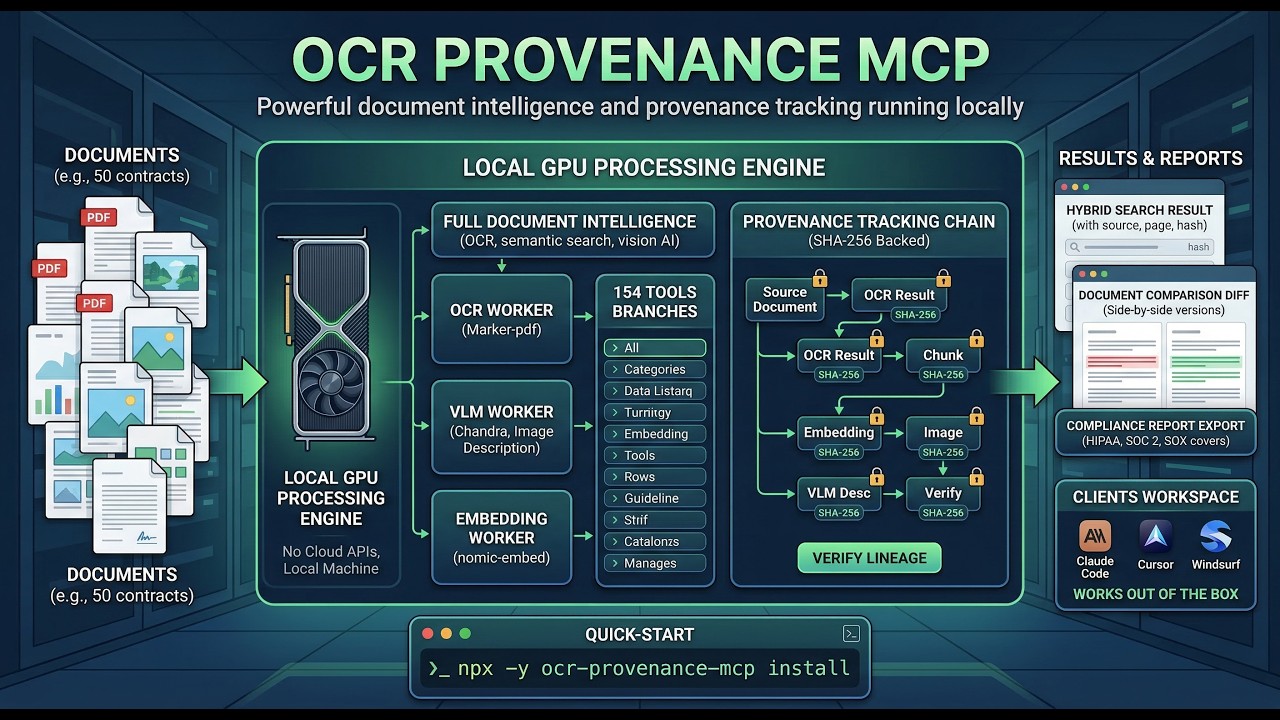
One Install. Your AI Gets 154 Tools.
Before
Copy-paste text from PDFs
Manually compare document versions
Can't prove data origin
No semantic search
Hours of manual work
Send documents to cloud APIs
After
"Search my 200 contracts for non-compete clauses" -- done in 200ms
Structured diff with every change flagged by significance
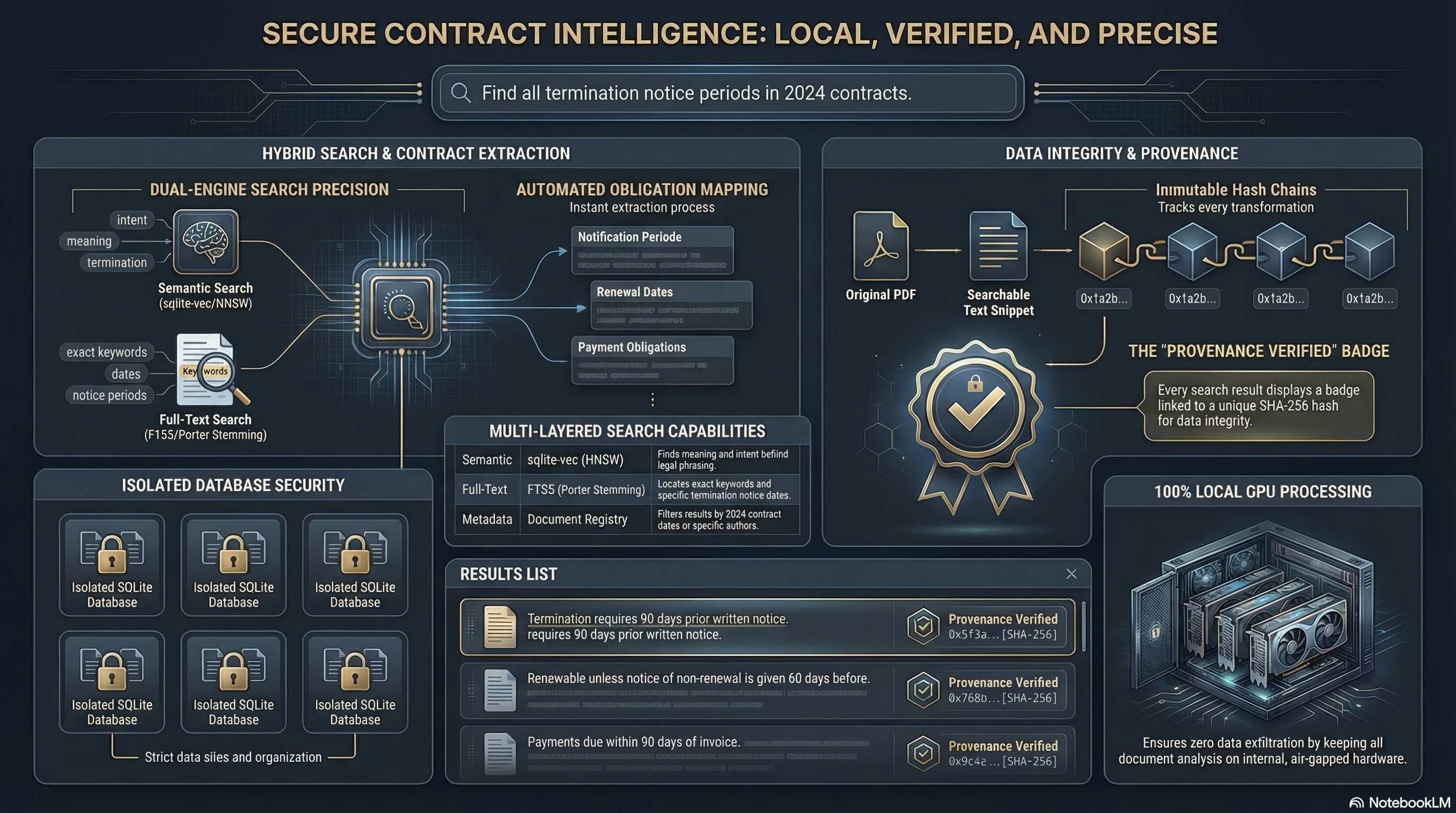
SHA-256 cryptographic provenance chain, W3C PROV export
Hybrid search: BM25 + 768-dim vectors + cross-encoder reranking
Full pipeline: 1,150 docs processed in ~3 minutes
100% local. Your hardware. Your data.
Copy-paste text from PDFs
"Search my 200 contracts for non-compete clauses" -- done in 200ms
Manually compare document versions
Structured diff with every change flagged by significance
Can't prove data origin
SHA-256 cryptographic provenance chain, W3C PROV export
No semantic search
Hybrid search: BM25 + 768-dim vectors + cross-encoder reranking
Hours of manual work
Full pipeline: 1,150 docs processed in ~3 minutes
Send documents to cloud APIs
100% local. Your hardware. Your data.
$ npx -y ocr-provenance-mcp install See Exactly What It Does

Included: Alex Hormozi Business Strategy Super Skill -- Every install ships with a pre-processed, fully searchable database of 1,147 Alex Hormozi YouTube video transcripts (last year of content) plus all 3 of his books ($100M Offers, $100M Leads, Gym Launch Secrets). That's 2.6+ million tokens of business strategy context -- more than fits in any context window. This is what we call a Super Skill: a skill that requires more context than a single context window can hold. Point your AI at this database and say "What would Hormozi do?" about pricing, offers, lead gen, copywriting, or anything. Ready to search the moment you install. No credits needed.
~2-5 sec/page
OCR Speed
~12ms/chunk
Embedding
<100ms
Semantic Search
<200ms
Hybrid Search
~3 min
Full Pipeline (1,150 docs)
$ npx -y ocr-provenance-mcp install 154 Tools Across 18 Categories. All Included.
Document Ingestion
7 Ingest files, directories. Process, retry, reprocess.
+
Document Ingestion
7Ingest files, directories. Process, retry, reprocess.
Tools in this category are available after install.
Search
7 Keyword, semantic, hybrid. Cross-database. RAG context.
+
Search
7Keyword, semantic, hybrid. Cross-database. RAG context.
Tools in this category are available after install.
Document Management
10 List, view, delete, deduplicate, version history, structure.
+
Document Management
10List, view, delete, deduplicate, version history, structure.
Tools in this category are available after install.
Provenance Tracking
6 Full chain-of-custody. SHA-256. W3C PROV export.
+
Provenance Tracking
6Full chain-of-custody. SHA-256. W3C PROV export.
Tools in this category are available after install.
Vision AI (VLM)
3 Describe images, charts, diagrams -- local Chandra VLM.
+
Vision AI (VLM)
3Describe images, charts, diagrams -- local Chandra VLM.
Tools in this category are available after install.
Image Processing
9 Extract, search, reanalyze, stats.
+
Image Processing
9Extract, search, reanalyze, stats.
Tools in this category are available after install.
Embeddings
4 768-dim vectors with nomic-embed-text-v1.5.
+
Embeddings
4768-dim vectors with nomic-embed-text-v1.5.
Tools in this category are available after install.
Document Comparison
6 Side-by-side diff. Batch compare. Similarity matrix.
+
Document Comparison
6Side-by-side diff. Batch compare. Similarity matrix.
Tools in this category are available after install.
Clustering
7 Auto-cluster by similarity. No parameter tuning needed.
+
Clustering
7Auto-cluster by similarity. No parameter tuning needed.
Tools in this category are available after install.
Contract Lifecycle
9 Clauses, obligations, calendar, playbooks, summaries.
+
Contract Lifecycle
9Clauses, obligations, calendar, playbooks, summaries.
Tools in this category are available after install.
Compliance & Audit
5 SOC 2, HIPAA, SOX. Full audit trail.
+
Compliance & Audit
5SOC 2, HIPAA, SOX. Full audit trail.
Tools in this category are available after install.
Collaboration
11 Annotations, locking, alerts, review workflows.
+
Collaboration
11Annotations, locking, alerts, review workflows.
Tools in this category are available after install.
Workflow & Approvals
8 Multi-step chains. Assignment. Queue management.
+
Workflow & Approvals
8Multi-step chains. Assignment. Queue management.
Tools in this category are available after install.
Database Management
20 Multi-DB. Backup, restore, clone, merge, snapshot, share.
+
Database Management
20Multi-DB. Backup, restore, clone, merge, snapshot, share.
Tools in this category are available after install.
Tags & Organization
6 Create, apply, search tags across everything.
+
Tags & Organization
6Create, apply, search tags across everything.
Tools in this category are available after install.
Reports & Analytics
8 Quality, cost, performance, error, trend analysis.
+
Reports & Analytics
8Quality, cost, performance, error, trend analysis.
Tools in this category are available after install.
Intelligence
5 Interactive guide. Table extraction. Smart recommendations.
+
Intelligence
5Interactive guide. Table extraction. Smart recommendations.
Tools in this category are available after install.
System
33 Health, config, maintenance, license, dashboard, webhooks.
+
System
33Health, config, maintenance, license, dashboard, webhooks.
Tools in this category are available after install.
"Other document tools give you OCR. We give you OCR + semantic search + vision AI + provenance + compliance + clustering + contract lifecycle + collaboration + workflow + analytics. All local. All in one install."
How It Works
Watch the full walkthrough
| Model | Purpose | VRAM |
|---|---|---|
| Marker-pdf v1.10.2 | Document OCR with layout preservation | 8-10 GB |
| Chandra v0.1.8 | Vision AI -- images, charts, diagrams | ~18 GB |
| nomic-embed-text-v1.5 | 768-dim semantic embeddings | 2-3 GB |
| HDBSCAN | Auto-clustering by similarity | CPU |
| ms-marco-MiniLM-L-12-v2 | Cross-encoder reranking | ~1 GB |
DOCUMENT --> OCR_RESULT --> CHUNK --> EMBEDDING
                       --> IMAGE --> VLM_DESC --> EMBEDDING
     ^ SHA-256 hash at every node
Your Data Never Leaves Your Machine. Ever.
100% local processing -- all inference on YOUR hardware
Ed25519 signed license tokens -- cryptographic offline verification
SHA-256 provenance chains -- every extraction linked to source
HMAC-signed balances -- tamper detection on all billing
Container hardening -- cap-drop=ALL, no-new-privileges, non-root
Secret isolation -- signing keys stripped from dashboard process
Zod schema validation on all 154 tool inputs
Directory traversal prevention on all file operations
Zero telemetry -- no analytics, no tracking, no phone-home
"We don't need to guarantee your data stays private. There's no cloud to send it to. The processing happens on your GPU, in a container, on your machine. That's not a promise -- it's the architecture."
Install Free. Pay Only When You Process.
First 100 customers who spend $100 get $10,000 credited to their account. That's 333,000+ files of processing power. Limited to the first 100.
$0.03 / file
Pay for what you use
- Full install with all 154 tools -- free
- .md and .txt files process for free (no OCR needed, embedding only, works great on CPU)
- Buy credits via Stripe for PDF, DOCX, PPTX, and other OCR-requiring formats
- All search, management, compliance, and collaboration tools -- always free
- No monthly fee, no subscription
- Credits never expire
- Add funds: $5, $10, $25, $50, or custom
- Includes bundled Alex Hormozi business strategy dataset -- ready to search immediately
$ npx -y ocr-provenance-mcp install Search and management tools are always free. Credits are only consumed when running OCR, VLM, or embedding on supported document formats.
Custom
For production use
- Everything in Pay-Per-Use
- Commercial license for production environments
- Priority support
- Volume pricing on credits
- Custom terms
"Most document intelligence tools charge $0.01-0.05 per page via cloud APIs. And your data leaves your machine every time. OCR Provenance processes locally on your hardware at $0.03/file -- and your data never leaves. Markdown and text files? Completely free."
What You Need
Supported Formats
20 file types supported. .md and .txt files process free -- no OCR models needed, just embedding. Works great on CPU.
System Requirements
| Component | Minimum | Recommended |
|---|---|---|
| Docker | Engine 20+ | Desktop (latest) |
| Node.js | 20+ | 22+ LTS |
| RAM | 8 GB | 16+ GB |
| Disk | 30 GB | 50+ GB |
| GPU | Optional (CPU works for .md/.txt) | NVIDIA RTX 3060+ (16+ GB VRAM) |
| OS | Windows with WSL2 | Windows with WSL2 + NVIDIA GPU |
Full GPU processing (OCR + VLM + Embeddings): Windows with NVIDIA GPU. Minimum 16 GB VRAM for VLM (Chandra). Recommended: 24 GB (RTX 3090/4090).
CPU-only mode: Works on Windows for .md/.txt embedding and all search/management tools. No GPU required.
macOS: Bare metal release coming soon. The Docker container does not currently support Mac GPU passthrough.
Linux: Supported with NVIDIA GPU via Docker.
Works With Your AI Client. Automatically.
Claude Code
claude mcp add ocr-provenance-mcp -s user -- npx -y ocr-provenance-mcp Claude Desktop
Add to claude_desktop_config.json Cursor
Add to ~/.cursor/mcp.json Windsurf
Standard MCP configuration "The installer auto-detects and registers with every supported client. You probably don't need to do any of this."
Stop Copying and Pasting. Give Your AI the Tools to Do the Work.
"Every document you process manually today is time you're not getting back. The install takes 60 seconds."
$ npx -y ocr-provenance-mcp install
Start processing documents in under 60 seconds
